
Quickstart
1. Install Kent Server and CLI
Section titled “1. Install Kent Server and CLI”Homebrew (macOS Apple Silicon/Linux)
Section titled “Homebrew (macOS Apple Silicon/Linux)”brew tap respawn-llc/tapbrew install respawn-llc/tap/kentArch Linux (AUR)
Section titled “Arch Linux (AUR)”The kent-bin AUR package is community-maintained.
yay -S kent-binStandalone binaries via GitHub Releases
Section titled “Standalone binaries via GitHub Releases”These versions are not auto-updated. Please keep them updated manually by re-running install scripts.
Linux:
curl -fsSL https://kent.sh/install.sh | shWindows:
irm https://kent.sh/install.ps1 | iexCheck the installed version with: kent --version
2. Optional: Install the Background Service
Section titled “2. Optional: Install the Background Service”Run this if you want one shared Kent server to start at login:
kent service installIt uses 20 MB of RAM when idle, lets unlimited frontends stay lightweight by connecting to one orchestrator, makes spawning and controlling subagents and background shells reliable, and enables the use of the desktop app. See Kent Server for details and service management commands.
3. Install Kent Desktop
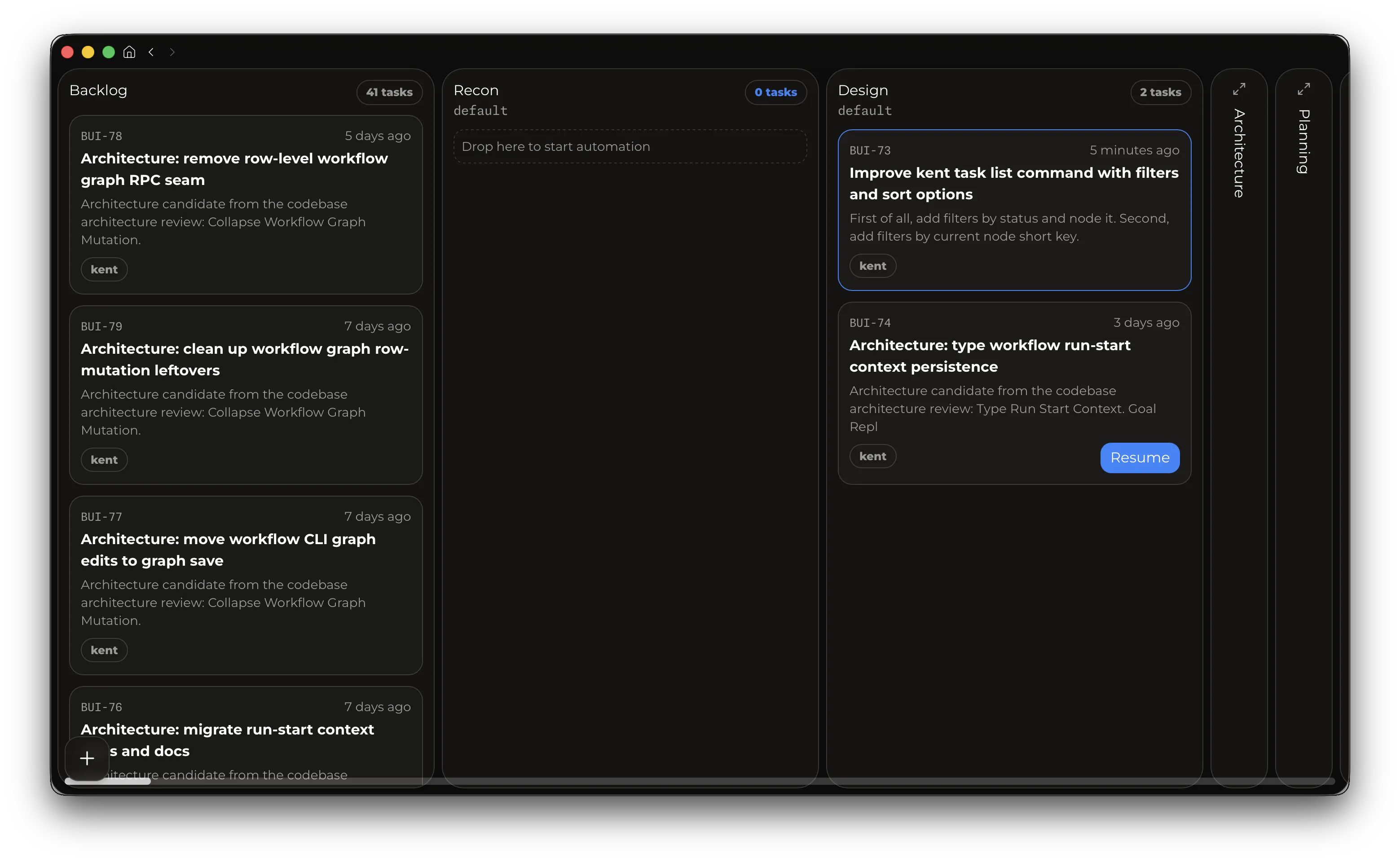
Section titled “3. Install Kent Desktop”The desktop app lets you use Kent’s Workflows and Tasks feature to build agentic loops and deterministic pipelines to fully automate processes and scale to 10s or 100s of agents.
Manual Install
Section titled “Manual Install”Download the installer for macOS Apple Silicon, Linux x86_64, or Windows x64 at kent.sh/desktop, or install the macOS app via Homebrew:
brew install --cask respawn-llc/tap/kent-desktopHomebrew installs update through brew upgrade, standalone installs self-update.
On macOS and Linux, drag local files into Kent Desktop to insert their absolute paths into the focused text input. This inserts text, not attachments. Drops without a focused editable input, and file drops on Windows or in a browser, are ignored.
First Use
Section titled “First Use”Start Kent CLI with: kent. The first run will ask you to pick auth option and walk you through onboarding.
The session picker shows when a newer Kent server release is available; update Kent through the installation channel you used.
Supported auth options:
- OpenAI/Codex subscription OAuth via the startup sign-in picker.
- OpenAI-based API-key auth via
OPENAI_API_KEY. If you prefer API-key auth, exportOPENAI_API_KEYbefore launch and kent will ask to use it. - No auth for custom providers. This option supports any provider like
ollama,omlxlocal models, or third-party providers like GLM coding plan. The only requirement is that the provider supports the OpenAI Responses format.
Main Workflows
Section titled “Main Workflows”- Press
F1to invoke the help menu. - Use
Enterto steer the model,Tabto queue messages. Slash commands can be queued too! - Use
Shift+Tabto toggle between detailed transcript mode and lean ongoing mode. - Type
$ <command>to execute a shell command and show its output to the model. - Press
Esctwice to enter Edit mode, which lets you go back in time, edit a previous message, and fork the session starting with it. UseUp/Downto walk through user messages. File edits are not rolled back. - Use the
Up/Downarrow keys to select and resend previous prompts. - Press
Ctrl+V,Ctrl+D,Alt+V, orAlt+Dto paste clipboard content: images become temporary file paths and text is inserted at the cursor. Terminal-native bracketed paste remains normal text input. - Use
/reviewto start a code review. In a non-empty session, Kent opens that review in a fresh child session. After the review finishes, you can use/backto teleport to the original session. /name <new-name>will set your session name in the picker and terminal title./autocompactionwill toggle compaction, and/compactwill trigger one. If autocompact is off, you can go above 100% context usage if model allows it. Going above 100% will cost more and degrade model performance.- Run
/statusto get detailed info about the session.
For the full command reference, see Slash Commands.
Configuration
Section titled “Configuration”Kent reads settings from ~/.kent/config.toml. The full reference is on the Configuration page.
Skills and Slash Commands
Section titled “Skills and Slash Commands”On first launch, the setup wizard can optionally import existing skills and slash-command directories from supported providers.
Kent discovers skills from:
<workspace>/.kent/skills~/.kent/skills<persistence-root>/.generated/skills
The generated root is managed by Kent. Copy a generated skill into a workspace or global skill root before customizing it.
You can disable skills for new sessions in config.toml:
[skills]creating-skills = falseChanges take effect when a session starts or after compaction.
Custom slash commands are server-owned and appear in the picker with 256-character previews. See Slash commands for discovery precedence, argument expansion, and unavailable-command behavior.
Supervisor
Section titled “Supervisor”- Use
/supervisorto toggle its invocation for the current session. Supervisor is a feature that will automatically review the edits made by the model. It increases costs by ~15% (if using the main model) but improves results. By default supervisor uses the same model as the main one. That may be too costly / too slow for you. Configuration page contains instructions on how to change supervisor model.
Advanced
Section titled “Advanced”Once you’re comfortable driving the traditional agentic CLI, consider upgrading to workflows.